Sunday, 14 May 2023

{How to} copy Model Driven App Dynamics 365

Hello Everyone,


Today i am going to show how to copy Model Driven App using Model Driven Copier.


Model Driven Copier is available on XRMTOOLBOX


Author: Yasir Safeer.


Many thanks to him and xrmtoolbox for making these tools available to Microsoft Community.


Lets see how we can copy the model driven app using this Model Driven Copier tool.


Lets gets started.


Open the XRMTOOLBOX.


If you don't have xrmtoolbox download from here
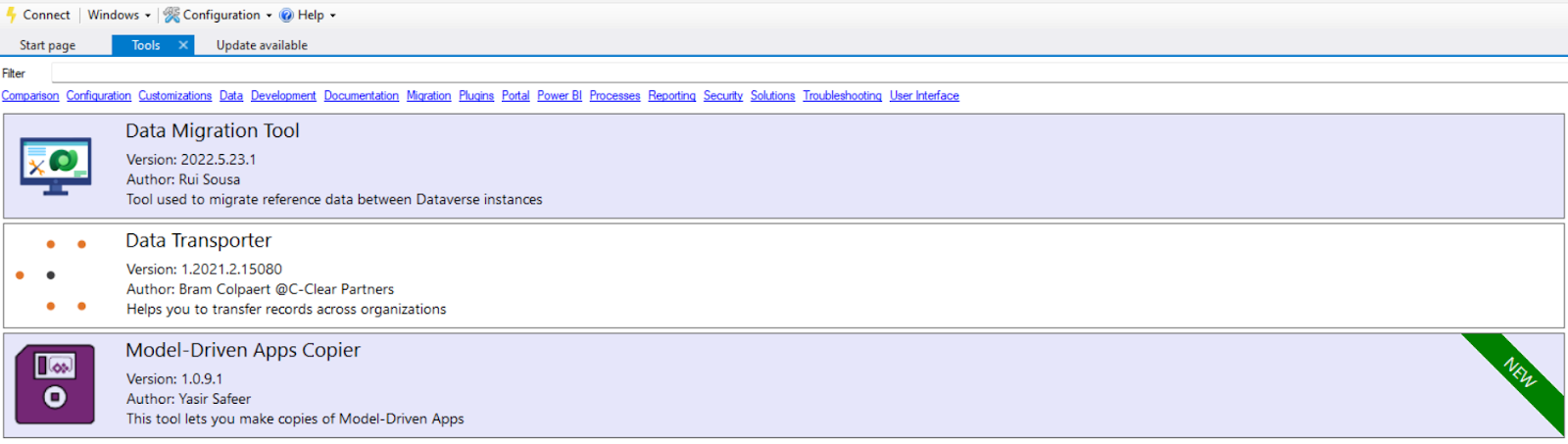


Then check for the Model Driven Copier tool on the library and install it.


So you can see the tool on tools area.


Open it and  make a connection. 



Choose the  Environment where you want to copy the model driven app and choose the environment appropriately.


Here from the above screen shot i have chosen "Project Operations PDI Project Ops" Model Driven App  then the tool will auto select the App into the " Copy From" and " App to create".


Note: On " App to create" Grid you need to choose Target Solution for the App, unique name, can provide description, "App URL Suffix" which will provide - Unified Interface URL" 


You can use as is of the model driven app app icon or choose default app icon by selected the check box for it.


Also you can provide source app welcome page by selecting the check box.


Regarding the first column in the "App to create" - Target Solution for the App =  you need this solution if you are going to export and import into other environments if you are planning for Production deployment after making your customizations on the Model Driven App.


Finally you click on the Copy on the Navigation Bar to copy the Model Driven App into the desired environment and solution.


I hope this helps.
Malla Reddy(@UK365GUY)
#365BlogPostsin365Days


Saturday, 13 May 2023

Did you know now you can do Practice Assessments for Microsoft Certifications

Hello Everyone,


Today i am going to share very helpful material which is free of cost from microsoft.


First of all many thanks to Jag Jubbal for sharing in the first instance with the community.


So if anyone willing to do certification then you can do practise exams with the link provided.


You can get confidence before you sit for final exam with Microsoft Certifications.


Here is the link for all Microsoft Certifications:


https://learn.microsoft.com/en-us/certifications/practice-assessments-for-microsoft-certifications


I hope this helps
Malla Reddy(@UK365GUY)
#365BlogPostsin365Days


Friday, 12 May 2023

{How to } enable geospatial features for the environment on Microsoft Dataverse

Hello Everyone,


Today i am going to share how to enable geospatial features for the environment.


Lets gets started.


Login into PPAC


Then select the environment and click on Settings.


Next expand the Products and then select the Features.


Undert the Map and address services, turn on the Full toggle. You can also use the toggles in this section to similarly turn on and off limited support as well.


Make sure read the terms and conditions of the third party data sharing and enable.


Finally save.


I hope this helps

Malla Reddy(@UK365GUY)
#365BlogPostsin365Days


Thursday, 11 May 2023

{How to} enable record ownership across Business Units in Microsoft Dataverse

Hello Everyone,


Today i am going to share new feature which allows a user to access another business unit records.


Lets gets started.


Before we dive into the new feature we need to understand about the "Hierarchical data access structure".


Hierarchical data access structure:


when do we use hierarchical structure, when data and user are compartmentalized in a tree like hierarchy.


Suppose we have three business units including a ROOT Business unit at the top.


When we associate a user with this environment, we can set the user to be in one of the three business units and assign a security role from the business unit to the user.


When a user creates a record is determined by the business unit associated user. With the association it allows us to craft the security role which allows the user to see records in the respective business unit.


User A is associated with Divison A and assigned a security role Y from Division A.  This will allow User A to access the Contact #1 and Contact #2 records. While user B in Division B cannot access Division A's Contact records but can access Contact #3 record.


Matrix data access structure(Modernized Business Units)


Customers can use an organisation structure where data is compartmentalized in a tree like hierarchy.

Users can work and access any business unit's data regardless of what the business unit the user is assigned to.


So when we assign a user with an environment, we can set the user to one of the three units . For each business unit that a user needs to access data, a security role is assigned from that business unit to the user.


When a user creates a record  the user can set the business unit to the own the record.


Here User A  can be associated with any of the business units, Including the root business unit. A security role Y from Division A is assigned to user A which gives the user access to Contact #1 and Contact #2 records.

A security role Y from Division B is assigned to user A which gives the user access to Contact #3 record.


How to enable this feature?

1. Login into  PPAC


2. Select the environment and Click on settings.


3. Then Products > Features


4. Turn on the "Record ownership across Business Units"


So once this feature is turned on, we can select the Business unit when you assign a security role to user. This allows you to assign  security role from different business unit to a user. 

The user requires a security role from the other business unit to be assigned in order to run the Model Driven Apps, with the user settings privileges.


I hope this helps.
Malla Reddy(@UK365GUY)
#365BlogPostsin365Days

Wednesday, 10 May 2023

{How to} enable canvas apps and cloud flows in Dataverse solutions

Hello Everyone,


Today i am going to share a new feature which is in preview how to enable canvas apps and cloud flows in Dataverse solutions.


Up until now we are adding the canavas apps and cloud flows to the solution manaully.


Now with this latest feature you can directly create canvas app or cloud flows in the Dataverse Solutions.


Lets see in action:


To enable this feature you need to login into PPAC


Select the environment and then settings:


Then click on the "Features":


Enable Canvas Apps


When you enable the canvas app i.e ON,  all apps will be stored as solutions in Dataverse, this means your users will likely need security roles updated for this environment.


Enable Cloud Flows:


When you turn on the Cloud Flow = ON : New cloud flows will be created inside a Dataverse Solution and your users will need the environment maker security role. Unsupported entry points, like sharepoint and teams, will fail to create any cloud flow until that support is added to create a solution cloud flow with that entry point.


Unsupported entry points are listed in the documentation: here


Now check the canvas apps and cloud flows can be created inside Dataverse solution:


Open the solutions and then select the your solution where you want to create the canvas app or cloud flow.


Click on the Objects and then click new as shown in below screenshot.


Once you click on the New chevron you will see the Apps, Automation, chatbot, dashboard, report, rules, security, table.. more..


click on the apps: then you can see the canvas app where you can create a canvas app inside dataverse solution.


Similarly you can create the Cloud flow by clicking on the Automation:


Now you can create Canvas App and Cloud Flows inside the Dataverse Solution.


Note: 
1. Solutions are stored in Dataverse, so the environment must have a database to use this feature.if your environment doesn't have database add one.

2. To create canvas app in solution, you must have write previleges to the CanvasApp Table. Also to create cloud flows in solutions, you should have the Environment Maker role, you can assign from security roles and privileges.

3. A canvas app or cloud flow in a solution must be shared with you before you can view or edit it.


Always check before you enable creation of canvas apps and cloud flows: considerations


I hope this helps

Malla Reddy(@UK365GUY)
#365BlogPostsin365Days

Tuesday, 9 May 2023

{Do you know} Maintenance Timeline for Microsoft Power Platform & Dynamics 365 Apps

Hello Everyone,


Today i am going to share the timeline of maintenance of microsoft updates related to the application of Power Platform - Dynamics 365 Apps.


Lets gets started.


Usually Microsoft will send the notifications about what the update is all about to the Power Platform/Dynamics 365  Administrators via email.


Maintenance Timeline windows for different regions will be here:


The timelines are Coordinated Universal Time - otherwise known as Greenwich Mean Time.


During the service update times: Database updates run as soon as possible depending on the system load during maintenance window of the environment.


If you want to know more about the Policies and Communications for Power Platform and Dynamics 365 Services here.


I hope this helps.
Malla Reddy(@UK365GUY)
#365BlogPostsin365Days

Monday, 8 May 2023

(How to set} App updates settings in Dynamics 365 CE Environment

Hello Everyone,


Today i am going to share a preview feature on Power Platform Admin Center related to the Publishers updates in your Dynamics 365 CE Environment.


Lets gets started.


As this is a preview features there will be changes based on the users feedback and its microsoft discretion.


How do you do that?

Lets do this in action.


1. Login into PPAC


2. Select the Production environmemt and click on the "..." and settings.


Configure app auto updates page:


Select the publishers from which you want to recieve app updates into this environment.


Toggle the button to "ON"


Then select the publisher from the dropdown.


Finally save the changes.


Note: All apps under selected publishers will be auto updated to the latest AppSource version during maintenance window hours.


I hope this helps.
Malla Reddy(@UK365GUY)
#365BlogPostsin365Days